DTC P0A85-123 Hybrid Battery Pack Cooling Fan 1 Control Circuit High |
| DTC No. | INF Code | DTC Detection Condition | Trouble Area |
| P0A85 | 123 | When the output voltage of the battery cooling blower assembly (VM) is too high compared to the target control voltage range (1 trip detection) |
|
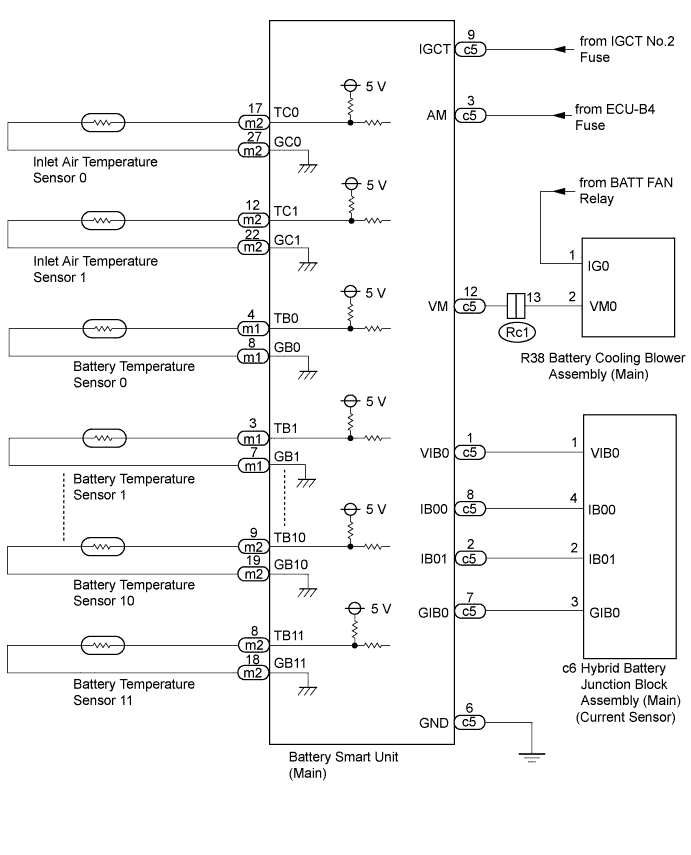
| 1.CHECK DTC OUTPUT (DTC P0AFC-123 IS OUTPUT) |
Connect the intelligent tester to the DLC3.
Turn the power switch on (IG).
Enter the following menus: Powertrain / HV Battery / Trouble Codes.
Read output DTCs.
| Result | Proceed to |
| P0AFC-123 is not output | A |
| P0AFC-123 is also output | B |
Turn the power switch off.
Disconnect the intelligent tester from the DLC3.
|
| ||||
| A | |
 |
| 2.CHECK HARNESS AND CONNECTOR (VM VOLTAGE) |
Disconnect the cable from the negative (-) battery terminal.
Check that the 3 service plug grips are not installed.
Remove the upper hybrid battery cover sub-assembly.
Connect the cable to the negative (-) battery terminal.
Connect the intelligent tester to the DLC3.
Turn the power switch on (IG).
Enter the following menu items: Powertrain / HV Battery / Active Test / Driving the Battery Cooling Fan.
Select each air volume mode (1 to 6) in the Battery Cooling Fan active test to operate the battery cooling blower assembly.
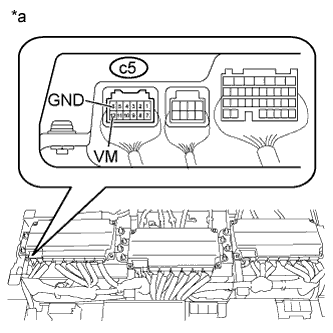 |
Measure the voltage according to the value(s) in the table below while the cooling fan is operating.
| Tester Connection | Switch Condition | Specified Condition |
| c5-12 (VM) - c5-6 (GND) | Power switch on (IG) | 5 V or less |
| *a | Component with harness connected (Battery Smart Unit (Main)) |
Turn the power switch off.
Disconnect the cable from the negative (-) battery terminal.
Install the upper hybrid battery cover sub-assembly.
Connect the cable to the negative (-) battery terminal.
|
| ||||
| OK | |
|
| 3.CHECK HV BATTERY (BATTERY TEMPERATURE SENSOR AND AIR TEMPERATURE SENSOR) |
Disconnect the cable from the negative (-) battery terminal.
Check that the 3 service plug grips are not installed.
Remove the upper hybrid battery cover sub-assembly.
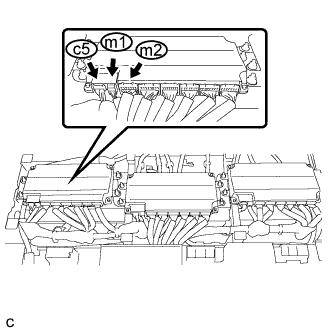 |
Disconnect connectors c5, m1 and m2 from the battery smart unit (main).
Measure the resistance according to the conditions and value(s) in the tables below.
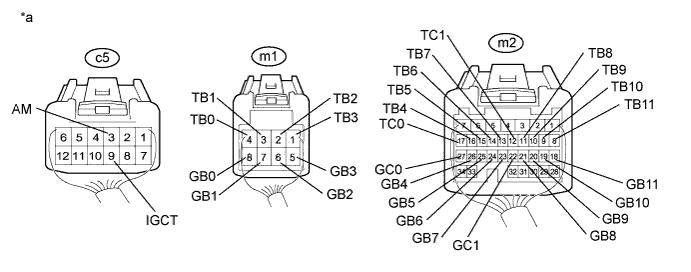
| *a | Rear view of wire harness connector (to Battery Smart Unit (Main)) | - | - |
| Tester Connection | Switch Condition | Specified Condition |
| m1-4 (TB0) - c5-9 (IGCT) | Power switch off | 10 kΩ or higher |
| m1-4 (TB0) - c5-3 (AM) | Power switch off | 10 kΩ or higher |
| m1-3 (TB1) - c5-9 (IGCT) | Power switch off | 10 kΩ or higher |
| m1-3 (TB1) - c5-3 (AM) | Power switch off | 10 kΩ or higher |
| m1-2 (TB2) - c5-9 (IGCT) | Power switch off | 10 kΩ or higher |
| m1-2 (TB2) - c5-3 (AM) | Power switch off | 10 kΩ or higher |
| m1-1 (TB3) - c5-9 (IGCT) | Power switch off | 10 kΩ or higher |
| m1-1 (TB3) - c5-3 (AM) | Power switch off | 10 kΩ or higher |
| m2-16 (TB4) - c5-9 (IGCT) | Power switch off | 10 kΩ or higher |
| m2-16 (TB4) - c5-3 (AM) | Power switch off | 10 kΩ or higher |
| m2-15 (TB5) - c5-9 (IGCT) | Power switch off | 10 kΩ or higher |
| m2-15 (TB5) - c5-3 (AM) | Power switch off | 10 kΩ or higher |
| m2-14 (TB6) - c5-9 (IGCT) | Power switch off | 10 kΩ or higher |
| m2-14 (TB6) - c5-3 (AM) | Power switch off | 10 kΩ or higher |
| m2-13 (TB7) - c5-9 (IGCT) | Power switch off | 10 kΩ or higher |
| m2-13 (TB7) - c5-3 (AM) | Power switch off | 10 kΩ or higher |
| m2-11 (TB8) - c5-9 (IGCT) | Power switch off | 10 kΩ or higher |
| m2-11 (TB8) - c5-3 (AM) | Power switch off | 10 kΩ or higher |
| m2-10 (TB9) - c5-9 (IGCT) | Power switch off | 10 kΩ or higher |
| m2-10 (TB9) - c5-3 (AM) | Power switch off | 10 kΩ or higher |
| m2-9 (TB10) - c5-9 (IGCT) | Power switch off | 10 kΩ or higher |
| m2-9 (TB10) - c5-3 (AM) | Power switch off | 10 kΩ or higher |
| m2-8 (TB11) - c5-9 (IGCT) | Power switch off | 10 kΩ or higher |
| m2-8 (TB11) - c5-3 (AM) | Power switch off | 10 kΩ or higher |
| m1-8 (GB0) - c5-9 (IGCT) | Power switch off | 10 kΩ or higher |
| m1-8 (GB0) - c5-3 (AM) | Power switch off | 10 kΩ or higher |
| m1-7 (GB1) - c5-9 (IGCT) | Power switch off | 10 kΩ or higher |
| m1-7 (GB1) - c5-3 (AM) | Power switch off | 10 kΩ or higher |
| m1-6 (GB2) - c5-9 (IGCT) | Power switch off | 10 kΩ or higher |
| m1-6 (GB2) - c5-3 (AM) | Power switch off | 10 kΩ or higher |
| m1-5 (GB3) - c5-9 (IGCT) | Power switch off | 10 kΩ or higher |
| m1-5 (GB3) - c5-3 (AM) | Power switch off | 10 kΩ or higher |
| m2-26 (GB4) - c5-9 (IGCT) | Power switch off | 10 kΩ or higher |
| m2-26 (GB4) - c5-3 (AM) | Power switch off | 10 kΩ or higher |
| m2-25 (GB5) - c5-9 (IGCT) | Power switch off | 10 kΩ or higher |
| m2-25 (GB5) - c5-3 (AM) | Power switch off | 10 kΩ or higher |
| m2-24 (GB6) - c5-9 (IGCT) | Power switch off | 10 kΩ or higher |
| m2-24 (GB6) - c5-3 (AM) | Power switch off | 10 kΩ or higher |
| m2-23 (GB7) - c5-9 (IGCT) | Power switch off | 10 kΩ or higher |
| m2-23 (GB7) - c5-3 (AM) | Power switch off | 10 kΩ or higher |
| m2-21 (GB8) - c5-9 (IGCT) | Power switch off | 10 kΩ or higher |
| m2-21 (GB8) - c5-3 (AM) | Power switch off | 10 kΩ or higher |
| m2-20 (GB9) - c5-9 (IGCT) | Power switch off | 10 kΩ or higher |
| m2-20 (GB9) - c5-3 (AM) | Power switch off | 10 kΩ or higher |
| m2-19 (GB10) - c5-9 (IGCT) | Power switch off | 10 kΩ or higher |
| m2-19 (GB10) - c5-3 (AM) | Power switch off | 10 kΩ or higher |
| m2-18 (GB11) - c5-9 (IGCT) | Power switch off | 10 kΩ or higher |
| m2-18 (GB11) - c5-3 (AM) | Power switch off | 10 kΩ or higher |
| m2-17 (TC0) - c5-9 (IGCT) | Power switch off | 10 kΩ or higher |
| m2-17 (TC0) - c5-3 (AM) | Power switch off | 10 kΩ or higher |
| m2-12 (TC1) - c5-9 (IGCT) | Power switch off | 10 kΩ or higher |
| m2-12 (TC1) - c5-3 (AM) | Power switch off | 10 kΩ or higher |
| m2-27 (GC0) - c5-9 (IGCT) | Power switch off | 10 kΩ or higher |
| m2-27 (GC0) - c5-3 (AM) | Power switch off | 10 kΩ or higher |
| m2-22 (GC1) - c5-9 (IGCT) | Power switch off | 10 kΩ or higher |
| m2-22 (GC1) - c5-3 (AM) | Power switch off | 10 kΩ or higher |
Connect the battery smart unit (main) connectors.
Install the upper hybrid battery cover sub-assembly.
Connect the cable to the negative (-) battery terminal.
|
| ||||
| OK | |
|
| 4.INSPECT BATTERY SMART UNIT (MAIN) |
Disconnect the cable from the negative (-) battery terminal.
Check that the 3 service plug grips are not installed.
Remove the upper hybrid battery cover sub-assembly.
Connect the cable to the negative (-) battery terminal.
Turn the power switch on (IG).
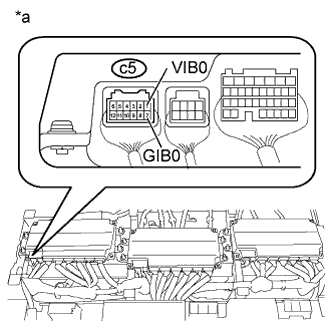 |
Measure the voltage according to the value(s) in the table below.
| Tester Connection | Switch Condition | Specified Condition |
| c5-1 (VIB0) - c5-7 (GIB0) | Power switch on (IG) | 4.6 to 5.4 V |
| *a | Component with harness connected (Battery Smart Unit (Main)) |
Turn the power switch off.
Install the upper hybrid battery cover sub-assembly.
|
| ||||
| OK | |
|
| 5.INSPECT HYBRID BATTERY JUNCTION BLOCK ASSEMBLY (MAIN (CURRENT SENSOR)) |
Disconnect the cable from the negative (-) battery terminal.
Check that the 3 service plug grips are not installed.
Remove the upper hybrid battery cover sub-assembly.
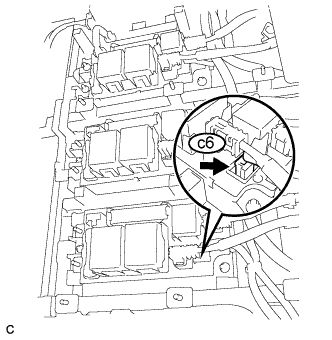 |
Disconnect connector c6 from the hybrid battery junction block assembly (main).
Connect the cable to the negative (-) battery terminal.
Turn the power switch on (IG).
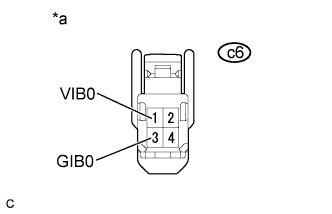 |
Measure the voltage according to the value(s) in the table below.
| Tester Connection | Switch Condition | Specified Condition |
| c6-1 (VIB0) - c6-3 (GIB0) | Power switch on (IG) | 4.6 to 5.4 V |
| *a | Front view of wire harness connector (to Hybrid Battery Junction Block Assembly (Main)) |
Turn the power switch off.
Connect the hybrid battery junction block assembly (main) connector.
Install the upper hybrid battery cover sub-assembly.
|
| ||||
| OK | ||
 | ||
| ||
| 6.CHECK BATTERY COOLING BLOWER ASSEMBLY (MAIN) |
Remove the rear deck trim cover.
Connect the intelligent tester to the DLC3.
Turn the power switch on (IG).
Enter the following menu items: Powertrain / HV Battery / Active Test / Driving the Battery Cooling Fan.
Select each air volume mode (1 to 6) in the Battery Cooling Fan active test to operate the battery cooling blower assembly.
Enter the following menus: All Data / VMF Fan Motor Voltage 1, Bat No.2 Fan Mtr V1 and Bat No.3 Fan Mtr V1.
Check that the Data List value (VMF Fan Motor Voltage 1) is abnormal while operating the cooling fans (battery cooling blower assemblies). (*1)
Turn the power switch off.
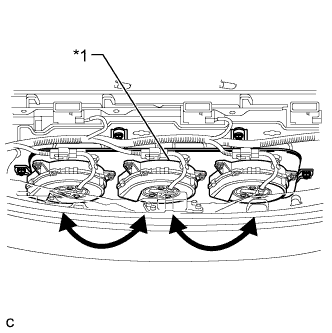 |
Switch the battery cooling blower assembly (main) with one of the other battery cooling blower assemblies (Click here).
| *1 | Battery Cooling Blower Assembly (Main) |
Turn the power switch on (IG).
Enter the following menu items: Powertrain / HV Battery / Active Test / Driving the Battery Cooling Fan.
Select each air volume mode (1 to 6) in the Battery Cooling Fan active test to operate the battery cooling blower assembly.
Enter the following menus: All Data / VMF Fan Motor Voltage 1, Bat No.2 Fan Mtr V1 and Bat No.3 Fan Mtr V1.
Check if the blower assembly (from *1 above) malfunctions in a different location while operating the cooling fans (battery cooling blower assemblies) using the Active Test.
| Result | Proceed to |
| Malfunction is not reproduced in same blower when it is moved to another location | A |
| Malfunction is reproduced in same blower when it is moved to another location | B |
Disconnect the intelligent tester from the DLC3.
Turn the power switch off.
Return the battery cooling blower assemblies to their original positions.
|
| ||||
| A | |
|
| 7.CHECK HARNESS AND CONNECTOR (BATTERY COOLING BLOWER (MAIN) - BATTERY SMART UNIT (MAIN)) |
Disconnect the cable from the negative (-) battery terminal.
Check that the 3 service plug grips are not installed.
Remove the upper hybrid battery cover sub-assembly.
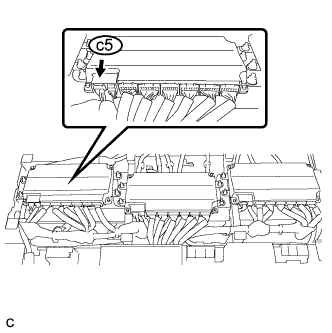 |
Disconnect connector c5 from the battery smart unit (main).
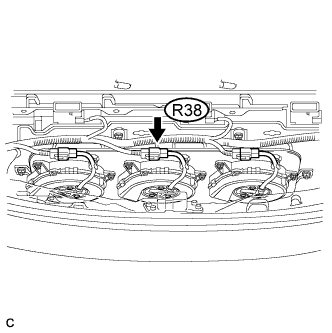 |
Disconnect the battery cooling blower assembly (main) connector.
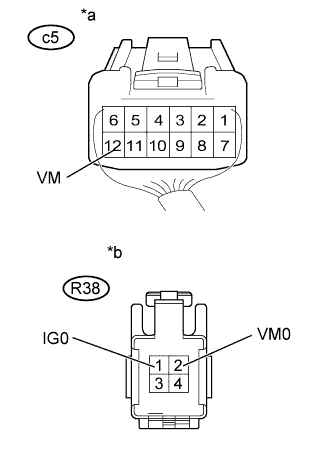 |
Measure the resistance according to the value(s) in the table below.
| Tester Connection | Switch Condition | Specified Condition |
| R38-2 (VM0) - c5-12 (VM) | Power switch off | Below 1 Ω |
| Tester Connection | Switch Condition | Specified Condition |
| R38-2 (VM0) or c5-12 (VM) - R38-1 (IG0) | Power switch off | 10 kΩ or higher |
| *a | Rear view of wire harness connector (to Battery Smart Unit (Main)) |
| *b | Front view of wire harness connector (to Battery Cooling Blower Assembly (Main)) |
Connect the battery cooling blower assembly (main) connector.
Connect the battery smart unit (main) connector.
Install the upper hybrid battery cover sub-assembly.
Connect the cable to the negative (-) battery terminal.
|
| ||||
| OK | ||
| ||
| ||
| 8.CHECK HARNESS AND CONNECTOR (BATTERY COOLING BLOWER ASSEMBLY (MAIN) - HV BATTERY) |
Disconnect the cable from the negative (-) battery terminal.
Remove the rear deck trim cover.
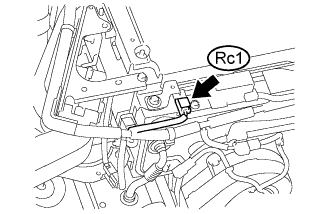 |
Disconnect connector Rc1 from the HV battery.
|
Disconnect connector R38 from the battery cooling blower assembly (main).
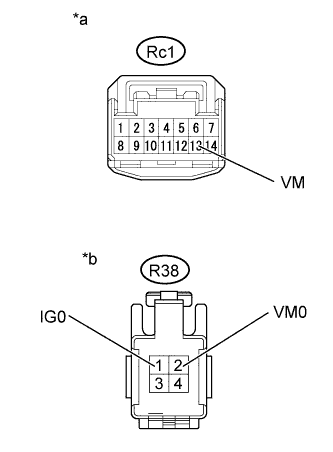 |
Measure the resistance according to the value(s) in the table below.
| Tester Connection | Switch Condition | Specified Condition |
| Rc1-13 (VM) - R38-2 (VM0) | Power switch off | Below 1 Ω |
| Tester Connection | Switch Condition | Specified Condition |
| Rc1-13 (VM) or R38-2 (VM0) - R38- 1 (IG0) | Power switch off | 10 kΩ or higher |
| *a | Front view of wire harness connector (to HV Battery) |
| *b | Front view of wire harness connector (to Battery Cooling Blower Assembly (Main)) |
Connect the battery cooling blower assembly (main) connector.
Connect the HV battery connector.
Install the rear deck trim cover.
Connect the cable to the negative (-) battery terminal.
|
| ||||
| OK | ||
| ||
| ||
| 9.CHECK HARNESS AND CONNECTOR (BATTERY SMART UNIT (MAIN) - HYBRID BATTERY JUNCTION BLOCK) |
Disconnect the cable from the negative (-) battery terminal.
Check that the 3 service plug grips are not installed.
Remove the upper hybrid battery cover sub-assembly.
|
Disconnect connector c5 from the battery smart unit (main).
|
Disconnect only connector c6 from the hybrid battery junction block assembly (main).
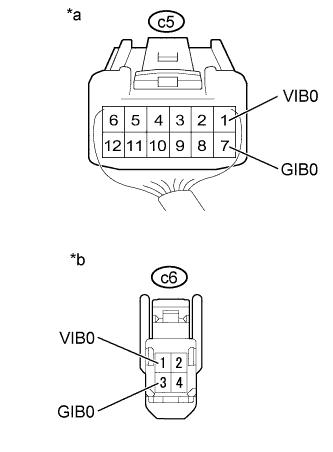 |
Measure the resistance according to the value(s) in the table below.
| Tester Connection | Switch Condition | Specified Condition |
| c5-1 (VIB0) - c6-1 (VIB0) | Power switch off | Below 1 Ω |
| c5-7 (GIB0) - c6-3 (GIB0) | Power switch off | Below 1 Ω |
| *a | Rear view of wire harness connector (to Battery Smart Unit (Main)) |
| *b | Front view of wire harness connector (to Hybrid Battery Junction Block Assembly (Main)) |
Connect the hybrid battery junction block assembly (main) connector.
Connect the battery smart unit (main) connector.
Install the upper hybrid battery cover sub-assembly.
Connect the cable to the negative (-) battery terminal.
|
| ||||
| OK | ||
| ||
| ||


